Accounts Payable Detail Invoice
Tab
This tab displays the most recent AP Invoice or Credit
Memo you were working on. Clicking the Invoice Number brings you to this
tab with that particular AP Invoice or Credit Memo in . When
you use the Invoice
Finder to find an AP Invoice, this is the tab that appears.
 : The paperclip
icon indicates that there is an attachment for the AP Invoice or Credit
Memo selected in context. Existing Attachments can be added or maintained
by clicking the paperclip icon. Attachments can also be added to
AP Invoices or Credit Memos from this tab using the Receive
Invoice, Receive Credit Memo,
Receive Credit
Memo for Selected Invoice, Maintain
Selected Invoice/Credit Memo, and Invoice
Attachments tasks. You can allow or require AP Invoice attachments
in System
Administration > Maintain Lookup Tables - Business Constants.
: The paperclip
icon indicates that there is an attachment for the AP Invoice or Credit
Memo selected in context. Existing Attachments can be added or maintained
by clicking the paperclip icon. Attachments can also be added to
AP Invoices or Credit Memos from this tab using the Receive
Invoice, Receive Credit Memo,
Receive Credit
Memo for Selected Invoice, Maintain
Selected Invoice/Credit Memo, and Invoice
Attachments tasks. You can allow or require AP Invoice attachments
in System
Administration > Maintain Lookup Tables - Business Constants.
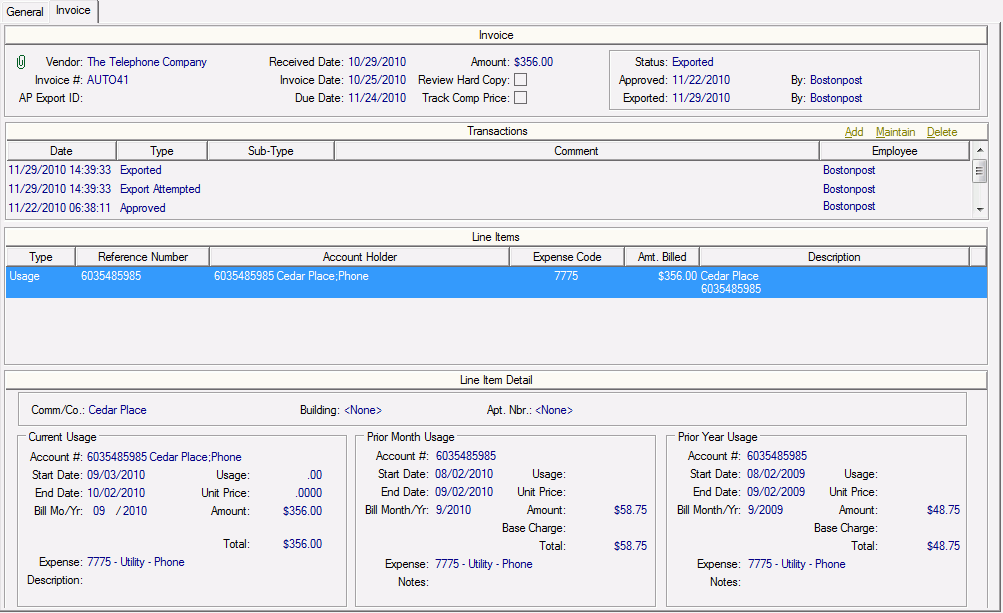
Below is an image of an AP Invoice for a Utility Bill for
usage. To view examples of other invoice types, click the following:
▪
▪
▪
Click the image for more information. A list of available
tasks is provided below.
Related Topics
▪ Receive
Invoice
▪ Receive
Utility Bills
▪ Add
Utility Account Holder
▪ Receive
Credit Memo
▪ Receive
Credit Memo for Selected Invoice
▪ Maintain
Selected Invoice/Credit Memo
▪ Delete
Invoices
▪ Invoice
Attachments
▪ Verify
Invoices
▪ Approve
Invoices
▪ Load
to Accounting
▪ Unverify
Invoices
▪ Unapprove
Invoices